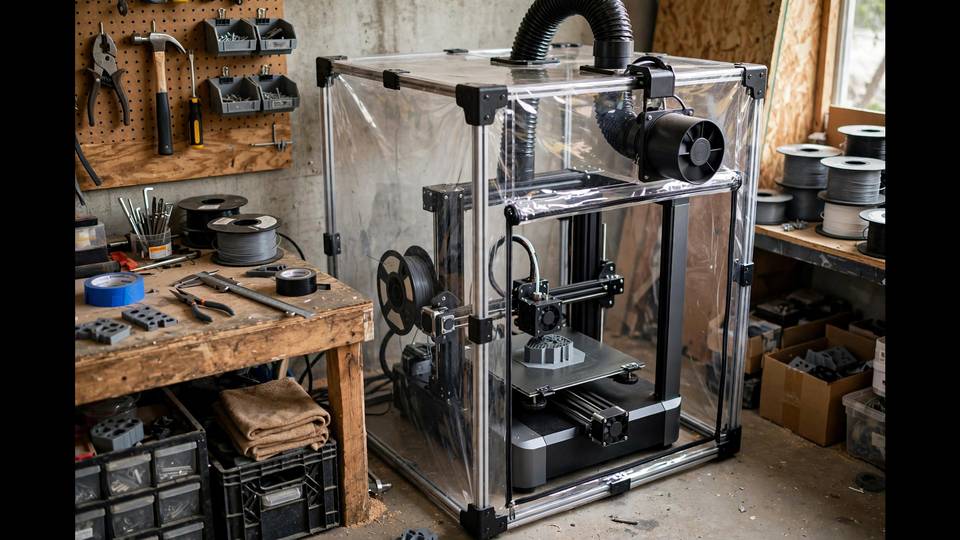
A 3D printer enclosure is a box around your printer — and it is one of the most misunderstood upgrades in the hobby. Some makers insist every printer needs one; others print happily for years without. The truth depends on what you print, where you print it, and what problems you are trying to solve. This guide to the best 3D printer enclosures covers when an enclosure actually matters, the best bought options, how to build your own, and the safety considerations nobody should skip.
An enclosure does three things: it stabilises the air temperature around the print (reducing warping), it contains fumes and ultrafine particles (health), and it keeps dust, draughts, and curious pets away from the print. Whether those benefits justify the cost and hassle depends entirely on your situation — which is exactly what we will work through. By the end of this guide you will know not just whether you need one, but which type suits your printer, your materials, and your budget.
Do You Actually Need an Enclosure?
You need one if: you print ABS, ASA, or nylon regularly (these warp badly in moving air and emit styrene fumes worth containing); your printer sits somewhere draughty; you have safety concerns about an open hot machine around kids or pets; or you want to reduce noise and smell.
You probably do not need one if: you print only PLA and PETG in a stable indoor room. These materials are far less warp-prone, and while an enclosure does not hurt them, the improvement is marginal — your money is better spent on calibration or better filament. Note that PLA can actually print worse in a hot enclosure (heat creep causing clogs), so an enclosure is not universally beneficial.
The honest middle ground: many makers start without one, then build or buy one when they get serious about engineering materials. That is a perfectly sensible path. An enclosure is also worth considering if your printer lives in a garage or shed where overnight temperatures swing wildly — even PLA benefits from stable ambient conditions, and the enclosure doubles as dust protection in workshop environments where sawdust and grinding debris would otherwise settle on your rails and lead screws.
Best 3D Printer Enclosures You Can Buy
Creality Enclosure (Fireproof Tent Style)
The cheapest of the best 3D printer enclosures is the pop-up tent sold by Creality and countless clones — the entry point most makers try first. It is essentially a fire-resistant fabric box with a metal frame — dead simple to set up, folds flat for storage, and costs a fraction of a hard enclosure. Downsides: the fabric insulates modestly (fine for ABS on most printers), access is through zippered flaps that get annoying, and the “fireproof” claim deserves scepticism — it is fire-resistant, not fireproof. Still, for the price, it solves warping for most users. Expect to pay roughly $80–130 AUD from Australian sellers.
Wham Bam HotBox / Similar Hard Enclosures
Stepping up, rigid enclosures like the Wham Bam HotBox offer proper panels, better insulation, integrated LED lighting, and cleaner cable management. They hold chamber temperatures higher and more stably than tents, which matters for large ABS parts and nylon. The trade-off is cost (several hundred AUD) and permanence — these are furniture, not accessories. Worth it if engineering materials are your daily work; overkill for occasional ABS prints. When comparing rigid options, check the internal dimensions carefully against your printer plus spool — some compact enclosures fit the printer but leave no room for a top-mounted spool, forcing awkward side-feeding arrangements.
Prusa Enclosure
Prusa’s official enclosure for the MK3S+/MK4 is the gold standard of bought options: precisely engineered, excellent filtration options, and designed specifically for the printer. It is also priced accordingly. If you run a Prusa and print ASA regularly, it is the fit-and-finish choice. For other printers, the dimensional specificity makes it less relevant.
Server Rack / IKEA Conversions
A used server cabinet — often free or cheap from office clear-outs — makes a superb enclosure: steel construction, existing ventilation fan mounts, and lockable doors. Check Gumtree and Facebook Marketplace; IT recyclers sometimes give them away. The 19-inch rack format even fits standard rack-mount accessories like fan controllers and power distribution. Measure your printer against the internal depth before committing — some shallow network cabinets will not fit a bed-slinger with its bed at full rear travel. Similarly, the venerable IKEA Lack table stack (two or three $15 Lack tables with printed brackets and acrylic panels) remains the classic budget hard enclosure. It will not win insulation awards, but for PLA/PETG draught protection and ABS warp reduction, it works remarkably well.
Best 3D Printer Enclosures to Build Yourself
Building your own enclosure is a rite of passage, and among the best 3D printer enclosures you can build yourself, the Lack deserves its reputation as the best first build. The basic recipe: two IKEA Lack tables stacked, 3D-printed corner brackets (designs all over Printables), and acrylic or polycarbonate panels cut to size. Total cost often lands under $150 AUD including panels, and you get a custom enclosure sized exactly for your printer.
Key DIY principles regardless of design:
- Do not enclose the power supply unless it is rated for it — PSUs need airflow. Mount it outside or ventilate its compartment separately.
- Electronics hate heat too. Mainboards are generally fine to chamber temperatures of 40–45°C, but if you are chasing high chamber temps for nylon or PC, consider relocating electronics outside.
- Filament stays dry outside the heat. Do not store PLA spools inside a warm enclosure long-term; heat plus moisture cycling degrades it. Feed filament through a Bowden tube from a dry box outside.
- Ventilation is a feature, not a flaw. A small exhaust fan with a carbon filter manages fumes without wrecking chamber temperature, especially if vented only during and after printing rather than continuously.
Noise Reduction: The Underrated Benefit
Nobody buys an enclosure for noise, but everyone appreciates it afterwards. An open printer’s fans and stepper motors produce a constant 45–55 dB whine that wears on household patience — particularly during 20-hour prints. A decent enclosure typically drops perceived noise by 8–12 dB, which the human ear experiences as roughly half as loud. For makers whose printer lives in a living area rather than a dedicated workshop, this alone can justify the build.
Maximise the effect with a few extras: place the enclosure on a foam or rubber mat to kill vibration transfer through the desk; ensure panels fit snugly without rattling (foam tape on panel edges works wonders); and consider stepper driver upgrades (silent TMC drivers) in combination — quiet electronics plus an enclosure makes a printer genuinely unobtrusive. Your family will thank you, and overnight prints stop being a negotiation.
Step-by-Step: The IKEA Lack Enclosure
Here is the classic build in enough detail to actually follow. You will need: two IKEA Lack side tables (the $15 ones — check the size fits your printer; an Ender 3 fits, larger machines need the bigger Lack or a custom design), a set of printed brackets (search “Lack enclosure” on Printables — the V2 designs are refined and well documented), acrylic or polycarbonate panels, and basic hardware.
Step 1 — Print the brackets first. You need your printer working well before it gets enclosed, so print all brackets in PETG (not PLA — the enclosure gets warm) before assembling anything. This is a satisfying weekend print batch in itself.
Step 2 — Stack and square. Place one Lack upside-down on top of another, using the brackets to join the legs. Check for square with a tape measure across diagonals — a racked frame makes every subsequent step painful. Shim if your floor is uneven.
Step 3 — Panels. Measure twice, cut once (or better, have your hardware store cut acrylic to your measurements). Leave the front as doors — hinged acrylic with printed hinges and magnetic catches — rather than a fixed panel. You will open this enclosure hundreds of times; make access pleasant.
Step 4 — Cable and filament management. Drill or cut a port for the power cable and a filament feed tube. Mount a spool holder or dry box on top or beside the enclosure, feeding down through a short PTFE tube. Keep the PSU outside if your printer’s design allows — most Ender-style machines have externally mounted PSUs already.
Step 5 — Extras. LED strip lighting (12V strips are cheap and transform usability), a thermometer/hygrometer display so you can see chamber conditions, and foam tape on all panel edges for a rattle-free seal. Total build time: a weekend. Total cost: typically $100–180 AUD depending on panel choices.
Ventilation and Filtration: The Health Angle
Let us talk honestly about fumes. PLA and PETG emit ultrafine particles and trace VOCs; ABS and ASA emit styrene, a more serious concern with chronic exposure. An enclosure contains these — which is good for the room but means you get a concentrated puff when you open the door. The complete solution is enclosure plus filtration or extraction.
Options in ascending effectiveness: a recirculating carbon/HEPA filter unit inside the enclosure (convenient, moderate effectiveness); a window-vented exhaust fan (very effective, requires a window adapter); or printing in a ventilated space like a garage with the door cracked. For ABS/ASA printing in a living space, filtration or extraction is not optional — it is the responsible choice, especially with kids in the house. Never vent fumes into a shared wall cavity or roof space; take it outside. If you can smell plastic strongly when you open the enclosure, your filtration is not keeping up.
Fire Safety: Non-Negotiable
3D printers are unattended heating appliances, and thermal runaway — while rare on modern machines with proper firmware — is a real phenomenon. An enclosure changes the fire equation in both directions: it can contain a small incident, but it also provides fuel and traps heat.
Minimum sensible precautions: never leave a printer running completely unattended without at least a camera and a smart plug for remote kill; keep a smoke detector in the room (a $15 device); know that most “fireproof” tent enclosures are fire-resistant fabric that delays rather than prevents; keep a fire extinguisher accessible; ensure your printer’s firmware has thermal runaway protection enabled (check — some budget boards ship with it disabled, which is genuinely dangerous); and route cables so nothing chafes against moving parts over hundreds of hours. For detailed printer safety guidance, Prusa’s knowledge base maintains excellent safety documentation that applies to any printer.
Enclosure vs No Enclosure: Material Guide
- PLA: no enclosure needed; may print worse in a hot one
- PETG: no enclosure needed; still air helps (see our PETG settings)
- TPU: no enclosure needed
- ABS: enclosure strongly recommended; ventilation required
- ASA: enclosure strongly recommended; ventilation required
- Nylon: enclosure required; dry filament essential
- Polycarbonate: heated chamber ideally; advanced territory
Frequently Asked Questions
Can I use a cardboard box as a 3D printer enclosure?
As a temporary draught shield, yes — many makers start this way. As a permanent solution, no: it is a fire risk near a 200°C+ hotend and provides poor temperature stability. Upgrade to something proper.
Will an enclosure help with PLA warping?
Marginally, but PLA warping is usually a bed-adhesion or cooling issue rather than ambient temperature. Fix the first layer and bed temperature before buying an enclosure for PLA.
How hot should the inside of an enclosure get?
For ABS/ASA, 35–45°C chamber temperature is the useful range for most hobby printers. Above ~50°C, PLA parts and some printer components (particularly electronics and PLA-printed mods) start suffering.
Do I need ventilation with an enclosure?
For PLA/PETG, opening a window suffices for most. For ABS/ASA, yes — either filtered recirculation or direct exhaust ventilation. Never print styrene-emitting materials in an unventilated living space.
Can I put my filament inside the enclosure?
Short-term during a print is fine, but do not store filament long-term in a warm enclosure. Heat cycling plus any humidity degrades filament. Use a dry box outside with a feed tube.