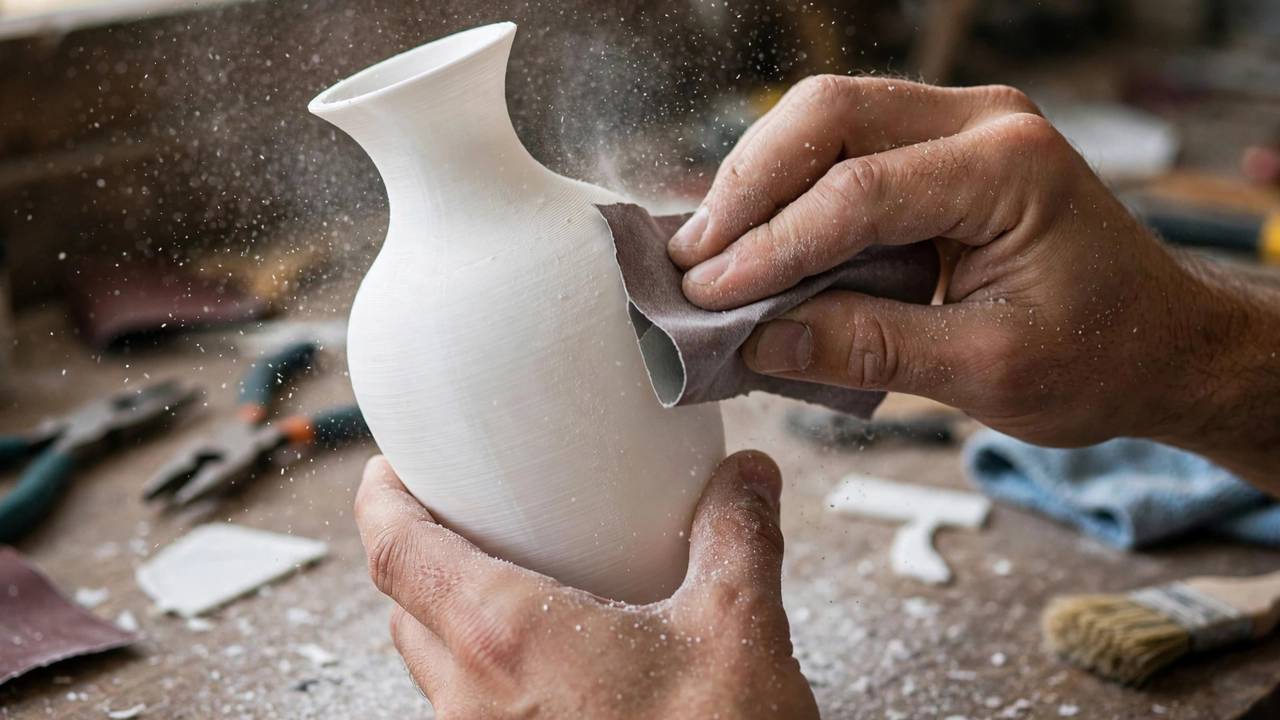
Learning how to smooth PLA prints is one of those skills that separates a rough prototype from a part that looks genuinely professional. Fresh off the printer, every FDM print wears its layer lines like a fingerprint — fine ridges that catch the light and scream “3D printed”. The good news: PLA is one of the friendliest filaments to finish. It sands beautifully, takes primer well, and plays nicely with epoxy coatings. The bad news: the internet is full of dodgy advice about shortcuts that either don’t work on PLA or will wreck your print. This guide walks through five proven methods, simplest to most advanced — and clears up the biggest myth of all: acetone vapour smoothing does nothing useful for PLA.
The One Rule: Acetone Vapour Does Not Smooth PLA
Before we touch a single sheet of sandpaper, let’s get the big one out of the way. Acetone vapour smoothing is a brilliant technique — for ABS and ASA. The acetone vapour softens the outer skin of the plastic, surface tension pulls it flat, and the layer lines melt away into a glossy finish. It’s fast, it’s dramatic, and it is completely useless on PLA.
PLA is a different polymer with different chemistry. Acetone barely interacts with it. Prusa’s own testing exposed PLA samples to acetone vapour for hours with no meaningful smoothing, and soaking prints in liquid acetone just bleached them or cracked them apart through solvent crazing. So if someone tells you to build an acetone vapour chamber for your PLA cosplay armour, politely ignore them. That chamber belongs to your ABS prints.
There is one solvent that does attack PLA — ethyl acetate — covered honestly later in this guide. For most makers, though, the reliable path to smooth PLA runs through sandpaper, primer, and resin, not chemistry experiments.
How to Smooth PLA Prints: Method 1 — Sanding
Sanding is the least glamorous and most dependable way to smooth PLA prints. Every other method here works better on top of a decent sanding job, and for small parts, sanding alone is often all you need. The secret isn’t elbow grease — it’s the grit progression.
The Grit Ladder: 120 to 2000
The mistake most beginners make is starting too fine or jumping too far between grits. Each grit’s job is to remove the scratches left by the previous one. Skip a step and you’ll sand forever. Here’s a progression that works:
- 120 grit (dry): knocks down layer lines, support marks, and elephant’s foot. Don’t gouge — PLA is soft and flat spots are hard to fix.
- 220–320 grit (dry or wet): removes the 120-grit scratches. This is where the part starts looking intentional rather than rescued.
- 400–600 grit (wet): scratches are shallow enough for wet sanding to take over. The surface should feel smooth to a dry fingertip.
- 800–1000 grit (wet): polishing territory — the part starts taking on a soft sheen.
- 1500–2000 grit (wet): only for a near-mirror finish or prepping for high-gloss clear coat.
You don’t always need to climb the whole ladder. If the part is getting painted, stopping at 400–600 grit is plenty — primer fills the rest. Reserve the ultra-fine grits for parts that will stay bare or get a clear coat.
Wet Sanding Technique
Once you’re past 320 grit, switch to wet sanding. Dunk the sandpaper in water (a drop of dish soap helps), keep the surface wet, and sand in gentle circles. Water carries away plastic dust so the paper doesn’t clog, and it keeps dust out of the air. Rinse the part and paper often — wet paper glides instead of grabbing.
A word on dust: dry-sanding any 3D print creates fine particulate you don’t want in your lungs, and sanding composite filaments is a genuine health concern. Wear a proper P2-rated dust mask for dry sanding, and read up on the extra precautions for fibre-filled materials in our guide to carbon fibre filament safety.
When to Stop
Stop when the surface passes the raking-light test: hold the part under a lamp at a low angle. Ridges catching the light means keep going; a uniform surface means you’re done. Further sanding just removes material and rounds off crisp edges. Note that sanding softens sharp edges and can erase small embossed text — mask delicate areas, and accept that heavily detailed miniatures are better suited to primer or resin than sandpaper.
This how to smooth PLA prints guide skips acetone vapour — it simply doesn’t work on PLA.
Method 2: Filler Primer and Spray Paint — The Reliable Pro Finish
If sanding is the foundation, filler primer is the cheat code. A high-build filler primer fills fine scratches and tiny layer lines, dramatically reducing how much sanding you need. This is the standard workflow for cosplay props, display models, and anything that needs to look moulded rather than printed.
The process rewards patience:
- Sand to 220–320 grit. You don’t need a mirror finish — the primer does the heavy lifting. Just get the surface uniform.
- Clean thoroughly. Wash the part in warm soapy water, rinse, and let it dry completely. Finger oils and sanding dust are the enemies of adhesion.
- First coat of filler primer. Light, even passes from 20–30 cm away. Two thin coats beat one thick coat every time — thick primer runs, sags, and obscures detail.
- Wet sand the primer with 400–600 grit once it’s fully cured. You’re levelling the primer, not removing it.
- Repeat. Two to three prime-and-sand cycles will erase layer lines on all but the coarsest prints.
- Topcoat. Finish with your colour coats and, if you like, a clear coat for durability and gloss.
In Australia, automotive filler primers from Supercheap Auto, Repco, or Bunnings work brilliantly on PLA and cost a fraction of hobby-branded primers. Look for “high build” or “filler” on the label. Always test on a scrap piece first — a bad reaction is better discovered on a test cube than a 40-hour helmet.
How to Smooth PLA Prints: Method 3 — Epoxy Resin Coating
When sanding alone can’t keep up — large cosplay pieces, helmets, anything with deep layer lines from a 0.3 mm draft print — brush-on epoxy resin is the fastest route to a smooth shell. The product most makers reach for is Smooth-On XTC-3D, a two-part epoxy formulated specifically for coating 3D prints. Mixed 2:1 by volume, it self-levels as you brush it on, fills layer lines in a single coat, and cures in around 3–4 hours to a hard, sandable, paintable shell.
The workflow: sand to 120–220 grit first (the resin needs something to grip), mix only what you can apply in about 10 minutes of working time, and brush on a thin, even coat. XTC-3D self-levels, so resist the urge to keep brushing — extra strokes introduce bubbles. Support the part so nothing touches the wet surface, and let it cure fully before sanding with 220–400 grit and priming as normal.
Honest caveats: epoxy adds measurable thickness (a fraction of a millimetre per coat), so avoid it on parts with tight tolerances or interlocking joints. It softens crisp edges and can fill fine engraved detail. The 10-minute working time is real — mix small batches and work decisively. Wear nitrile gloves and ventilate the room. The payoff is real too: a single evening’s work can take a rough draft-quality print to a surface that looks injection-moulded under paint.
Patience matters more than products when learning how to smooth PLA prints.
Method 4: Heat Gun — Quick, But Handle With Care
A heat gun can soften the outermost skin of PLA just enough to take the sharp edge off layer lines and give a slight sheen. It’s the fastest method on this list — seconds per area — which is exactly why it’s also the riskiest. PLA’s glass transition temperature sits around 60 °C, and a heat gun on full blast will blow straight past it into sagging, warping, and bubbled surfaces.
If you want to try it: lowest heat setting, 15–20 cm away, keep it moving constantly — never linger. You’re aiming for a brief kiss of heat as the surface goes faintly glossy. Test on scrap first, and treat this as a finishing pass after sanding rather than a standalone method.
Skip the heat gun on thin-walled parts, overhangs, or anything with tight tolerances. Heat-softened PLA has a habit of looking fine until it cools into a subtly different shape.
Method 5: Slicer Ironing — Smooth Tops for Free
Ironing is the only method here that happens before the print even leaves the build plate. Available in PrusaSlicer, OrcaSlicer, Bambu Studio, and Cura, ironing runs the hot nozzle over the topmost layer a second time with little or no extrusion, melting the surface flat. Prusa’s own documentation notes that PLA irons very nicely — though it’s the most prone to heat creep, so watch your cooling.
Enable it in your slicer under top surface settings and expect a modest amount of extra print time. The catch: ironing only affects flat, upward-facing top surfaces — nothing for walls, curves, or overhangs, which is where layer lines live on most models. It’s a free upgrade for box tops, lids, and display bases, not a replacement for post-processing.
What About Vapour Smoothing PLA With Ethyl Acetate?
Let’s return to the chemistry question, because you’ll see ethyl acetate mentioned in forums as “the acetone for PLA”. The claim is real: ethyl acetate genuinely dissolves PLA, and a published study on chemical vapour treatment of PLA parts measured surface roughness reductions of up to 81% using ethyl acetate vapour. Unlike acetone, it actually works.
Here’s why we still don’t recommend it for most makers. Ethyl acetate is highly flammable, its vapours demand a respirator and serious ventilation, and the process is unforgiving — a minute too long and fine detail melts into mush. There’s no consumer-friendly equivalent of the acetone/ABS process; the margin between “smooth” and “ruined” is thin. If you attempt it, use a sealed glass or metal chamber, chemical-resistant gloves, an organic-vapour respirator, strong ventilation, and zero ignition sources nearby. For nearly all hobbyists, sanding plus primer delivers a comparable result with none of the risk.
Choosing the Right Method for Your Print
Match the method to the job and you’ll save yourself hours:
- Small functional parts (brackets, enclosures, drone components that need to look clean): sand to 400 grit and stop. Paint only if corrosion or UV is a concern.
- Display models and miniatures: sand to 320, then filler primer cycles. Epoxy only if the layer lines are deep.
- Cosplay armour and helmets: XTC-3D or equivalent epoxy, then primer and paint. Sanding a full suit of armour by hand is a special kind of misery.
- Flat-topped practical prints: turn on ironing in the slicer and enjoy the free upgrade.
- Anything with tight tolerances: sand only, and sand sparingly. Every coating adds thickness.
Whatever you choose, the unglamorous truth holds: surface finish is 90% preparation. A careful sanding job under cheap primer beats a rushed job under expensive resin every single time.
Frequently Asked Questions
Can you smooth PLA with acetone vapour?
No — not effectively. Acetone vapour smoothing works beautifully on ABS and ASA because acetone dissolves those plastics, but PLA’s chemistry is different. Prusa’s testing found that hours of acetone vapour exposure left PLA barely softened, while liquid acetone baths bleached and cracked prints. If you want a vapour-smoothed finish, print the part in ABS or ASA instead.
What is the easiest way to smooth PLA prints?
Sanding with a proper grit progression (120 up to 400–600) followed by filler primer is the easiest reliable method. It needs no special chemicals and works on any shape. For flat top surfaces, enabling ironing in your slicer gives a smoother finish for zero extra effort.
What grit sandpaper should I use on PLA?
Start at 120 grit to remove layer lines and support marks, work through 220–320, then switch to wet sanding from 400 up to 800–2000 depending on how glossy you want the finish. If you’re painting, stopping at 400–600 grit is enough — the primer handles the rest.
Does XTC-3D work on PLA?
Yes. Smooth-On XTC-3D is explicitly formulated for PLA (plus ABS, PETG, and resin prints). It’s a 2:1 two-part epoxy you brush on; it self-levels, cures in about 3–4 hours to a hard 80D shell, and can be sanded, primed, and painted. It adds thickness, so avoid it on parts with tight mechanical fits.
Is ethyl acetate safe for smoothing PLA at home?
It works, but we don’t recommend it as a casual home technique. Ethyl acetate is highly flammable, its vapours need a respirator and ventilation, and overexposure ruins parts easily. Research shows it cuts surface roughness dramatically, but the process window is narrow — sanding and primer give comparable results with far less risk.
Can a heat gun smooth PLA layer lines?
Partially. A heat gun on low, kept moving at 15–20 cm distance, can soften the surface enough to take the edge off layer lines and add a slight sheen. But it won’t erase deep lines, and PLA warps easily above 60 °C — so it’s a finishing touch after sanding, not a standalone method, and it’s unsuitable for thin or tolerance-critical parts.