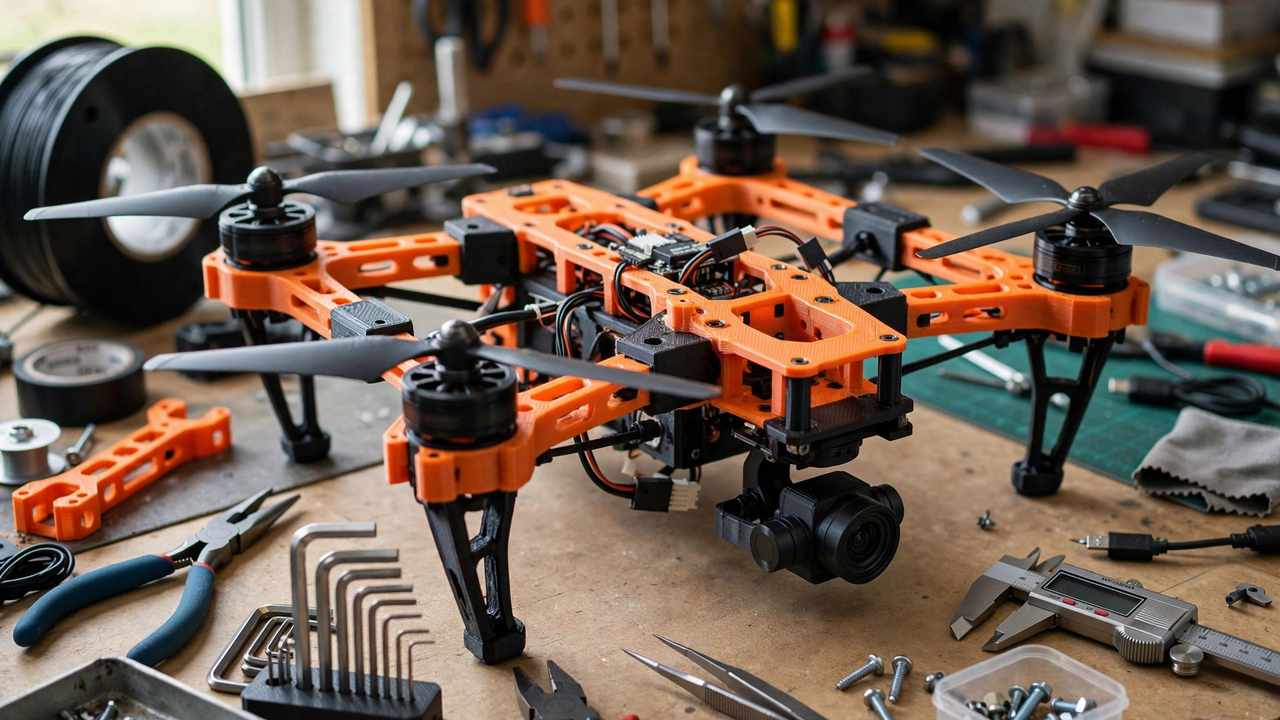
If you fly FPV or camera drones in Australia, 3D printed drone parts are one of the most useful things your printer can make. Cracked a GoPro mount at the field? Print a new one before the next battery. Need a GPS mast that actually fits your frame? Design it in the morning, fly it in the afternoon. But drones punish weak parts — vibration, crashes, and spinning props don’t forgive bad material choices. This guide covers which parts are worth printing, which materials survive real flying, how to design for strength without adding grams, and the CASA rules you need to know before your printed creation leaves the ground.
Why 3D Print Drone Parts?
Off-the-shelf drone parts are great until they aren’t. Manufacturers discontinue frames, a mount never quite fits your stack, or you want to try an idea nobody sells yet. Printing your own parts solves all three problems at once.
The biggest win is iteration speed. A camera mount that takes three weeks to ship from overseas can be designed, printed, test-fitted, and revised in a single evening. FPV pilots are notorious tinkerers, and a printer turns “I wish someone made this” into “I made this.”
There’s also the repair angle. Drones crash — it’s part of the hobby. Being able to print replacement arms, landing feet, and antenna mounts means a crash costs you a few grams of filament instead of a new frame. For tiny whoops and toothpick builds especially, printed parts keep you in the air instead of waiting on the post.
That said, printed parts aren’t magic. A drone part lives in one of the harshest environments in the hobby: constant vibration, hard impacts, UV exposure, and sometimes serious heat near motors and ESCs. Material and design choices matter enormously, which is where most beginners go wrong.
Which Drone Parts Are Worth Printing?
Not everything on a drone should come off a print bed. Here’s an honest breakdown.
Great candidates for printing
- Camera and GoPro mounts — the classic. TPU mounts absorb vibration beautifully and protect your camera in crashes.
- Antenna mounts and SMA holders — small, custom-fit, and easy to replace.
- GPS masts and compass mounts — get your GPS away from electrical noise with a tall printed mast.
- Landing feet and skids — TPU feet save your frame and your props on hard landings.
- Frame arms and plates (with the right material) — printable, but only in tough materials like PA-CF or polycarbonate, and only with careful design.
- Battery pads, buzzer mounts, capacitor holders — small functional bits that tidy up a build.
- Prop guards for cinewhoops — many whoop frames are printed or print-compatible by design.
Parts to think twice about
- Propellers — just don’t. Printed props can shatter at high RPM and throw sharp fragments. Buy proper props; they’re cheap and balanced.
- Motor bells or structural motor parts — heat and centrifugal force are a bad combination for printed plastic.
- High-stress frame joints on large rigs — a 7-inch long-range quad hitting a tree at speed generates forces that will find every weakness in a print.
The rule of thumb: print the parts that protect, mount, and organise. Be cautious with parts that carry the main flight loads unless you’re using serious materials and tested designs. For more on choosing materials that can actually take abuse, see our guide to printing with carbon fibre filament safely.
Best Materials for 3D Printed Drone Parts
Material choice is the single biggest factor in whether your printed drone part survives its first crash. Here’s how the common options stack up.
TPU — the crash-proof workhorse
Thermoplastic polyurethane is the undisputed king of drone printing. It’s flexible, absorbs impacts instead of shattering, and grips well. TPU is what you want for GoPro mounts, antenna holders, landing feet, and anything that should bend rather than break. Print it slow (20–30 mm/s is a safe starting point), keep retractions modest to avoid jams, and dry it — TPU drinks moisture from the air.
PETG — the balanced all-rounder
PETG is tougher than PLA, handles heat better (glass transition around 80°C vs PLA’s ~60°C), and resists UV reasonably. It’s a solid choice for frames on smaller quads, GPS masts, and general brackets. It’s not as impact-resistant as TPU, but it’s stiffer, which matters for parts that need to hold alignment. Most pilots’ first “real” drone prints are PETG.
ASA — for sun and heat
ASA is like ABS’s better-behaved sibling: good UV resistance, decent heat tolerance, and tough. It’s excellent for parts that live outdoors in the Australian sun. The catch is that it warps and really wants an enclosure. If your printer is enclosed, ASA is a step up from PETG for structural drone parts.
PA-CF / Nylon composites — the serious stuff
Polyamide (nylon) blended with chopped carbon fibre is the closest you get to “proper” engineering material on a desktop printer. It’s stiff, strong, and survives crashes that would turn PLA into confetti. The trade-offs are real: it needs high temperatures (260°C+), an enclosure, thorough drying, and a hardened nozzle. If you’re printing full frames, this is the material class to aim for — after you’ve worked up to it.
PLA — know its limits
PLA is fine for prototyping fit and for parts that never see stress or heat — a battery strap slot cover, a decorative canopy, a buzzer mount. But PLA softens in a hot car (a real risk in an Australian summer), shatters on impact, and creeps under sustained load. Don’t build structural drone parts from plain PLA and expect them to last.
Quick material comparison
- Prototyping / fit checks: PLA (cheap, easy)
- Flexible mounts, guards, feet: TPU
- General brackets and small frames: PETG
- Sun-exposed structural parts: ASA (enclosure needed)
- High-performance frames: PA-CF / nylon composites (enclosure + hardened nozzle needed)
3D Printed Drone Parts: Designing Parts That Survive
A well-designed PETG part will outperform a badly designed nylon one. Strength in printed parts comes mostly from geometry and print orientation, not just material.
Print orientation is everything
FDM prints are weakest between layers — that’s just physics. Orient your part so the main crash forces run along the layers, not across them. A frame arm printed flat (layers horizontal) will snap at the layer lines when it flexes; the same arm printed on its side, with layers running lengthwise, is dramatically stronger. Before you slice, ask: “which direction will this break?” Then rotate the part so the layer lines don’t align with that force.
Walls beat infill
For functional parts, perimeters (walls) contribute far more strength than infill. Four to six walls with 30–40% infill will outperform two walls with 100% infill in most real-world tests — and print faster. For TPU mounts, even more walls help; TPU’s flexibility means thin walls tear.
Design for the process
- Round your corners. Sharp internal corners concentrate stress and start cracks. A 2–3mm fillet costs nothing and adds real toughness.
- Add ribs, not bulk. A thin rib along a bending axis adds stiffness without the weight of a solid block.
- Size holes for hardware properly. Heat-set inserts (melted in with a soldering iron) give you real metal threads in plastic — far stronger than tapping directly into a print. M3 inserts are the standard for drone builds.
- Keep it light. Every gram on a quad is a gram the motors must lift and the battery must carry. Hollow where you can, lattice where it makes sense, and don’t overbuild.
- Tolerances matter. Print a small test piece of any press-fit or mating feature before committing to a two-hour print. Plastics shrink and every printer is slightly different.
Vibration is the silent killer
Even parts that survive crashes can fail from vibration fatigue over time. Screws back out (use threadlocker or nyloc nuts), thin printed standoffs crack, and camera mounts soften. TPU’s damping properties are why it’s the go-to for anything touching the flight controller or camera — it soaks up the high-frequency buzz that makes footage jello and loosens hardware. If your HD footage has wobble, a better TPU mount is often the fix, not a new camera.
CASA Rules: What Australian Pilots Must Know
Printing the parts is only half the job — you also need to fly legally. In Australia, drones are regulated by the Civil Aviation Safety Authority (CASA), and the rules apply whether your quad is store-bought or mostly printed in your garage.
For recreational flying (which covers most hobby pilots), the key rules are:
- Stay under 120 metres above ground level.
- Keep your drone in visual line of sight at all times — your own eyes, not just the FPV feed or a spotter’s word.
- Stay at least 30 metres away from other people.
- Don’t fly within 5.5 km of a controlled aerodrome (one with an operating control tower).
- Fly during daylight only and fly only one drone at a time.
- Never fly over emergencies — bushfires, accident scenes, or emergency operations.
Recreational pilots don’t currently need a licence or registration, but the safety rules still apply to everyone. If you start flying for money, the rules change: commercial sub-2kg operations fall under CASA’s excluded category, which requires operator accreditation and registration. Check the current requirements on CASA’s website before you fly. The official source is casa.gov.au.
Printing Tips for Drone Parts
- Dry your filament. TPU and especially nylon absorb moisture fast, and wet filament prints weak, stringy parts. A filament dryer or a sealed box with desiccant is cheap insurance.
- Calibrate first. Dimensional accuracy matters when parts must mate with carbon plates and M3 hardware. Print a 20mm calibration cube and check your flow and e-steps before the real part.
- Use the right nozzle. Anything with carbon fibre or glass fill needs a hardened steel nozzle at minimum — brass wears out in hours and your extrusion goes inconsistent. (More on this in our carbon fibre safety guide.)
- Slow down for TPU. Flexible filament and speed don’t mix. Slow print speeds and direct-drive extruders give the cleanest results.
- Test before you trust. Flex the part in your hands. Drop it on the bench. If it feels wrong on the ground, it won’t survive the air.
- Keep spares. The whole point of printing is fast replacement — when a design works, print two.
And if you want your functional prints to look as good as they perform, our guide to smoothing prints covers sanding through to professional finishes.
Frequently Asked Questions
Can you 3D print a whole drone frame?
Yes, and many people do — especially for micro quads, cinewhoops, and experimental designs. The catch is material and design: use PETG at minimum for small quads, and step up to ASA or PA-CF nylon composites for anything larger or faster. A well-designed printed frame in the right material flies great; a PLA frame printed flat will fold on its first real crash. Start with mounts and accessories, then work up to frames as your skills grow.
What is the strongest 3D printing filament for drone parts?
For desktop printers, polyamide (nylon) blended with chopped carbon fibre (PA-CF) is the strongest practical option — stiff, tough, and crash-resistant. Polycarbonate is another strong contender. Both need an enclosed printer, high temperatures, and hardened nozzles. For most pilots, the sweet spot is simpler: TPU for flexible parts and PETG or ASA for rigid parts.
Are 3D printed drone parts legal in Australia?
The parts themselves aren’t regulated — CASA regulates how and where you fly, not what your drone is made of. As long as you follow the standard recreational rules (under 120m, visual line of sight, 30m from people, daylight only, away from aerodromes), a drone with printed parts is fine. If the build is for commercial work, the usual commercial requirements like operator accreditation apply regardless of how the parts were made.
Why do my 3D printed drone parts keep breaking?
The three usual culprits are wrong material (PLA for structural parts), wrong orientation (forces pulling layer lines apart), and too few walls. Switch to PETG or better, orient the print so loads run along the layers, and use 4–6 perimeters. Also check for wet filament — moisture makes parts brittle and ugly.
Can I 3D print drone propellers?
Technically you can, but you shouldn’t. Printed props can shatter at high RPM, throwing sharp fragments, and they’ll never be as balanced or efficient as moulded props. Props are cheap — buy them. Save your printer for mounts, guards, and frames.
How much does it cost to print drone parts?
Very little per part — a GoPro mount might use 15–25g of TPU, which is a couple of dollars in filament. The real cost is your time designing and iterating. Compared to buying proprietary mounts at $15–30 each (plus shipping), printing pays for itself quickly if you crash with any regularity.